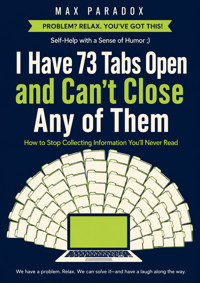
I Have 73 Tabs Open and Can't Close Any of Them - How to Stop Collecting Information You'll Never Read ebook
Max Paradox
Uzyskaj dostęp do tej i ponad 240000 książek od 14,99 zł miesięcznie
- Wydawca: ALL-IN Rafał Płonkowski
- Kategoria: Biznes, rozwój, prawo•Biznes, rozwój
- Język: angielski
You opened one tab to answer one question.
Now there are 73.
One contains an article you definitely plan to read. Another contains a product you might buy. Nine are part of a comparison you stopped understanding yesterday. Somewhere in the middle is a video you opened three weeks ago because it looked “important,” although nobody-including you-can now explain why.
I Have 73 Tabs Open and Can't Close Any of Them is a practical, funny guide to escaping digital information overload without becoming a minimalist hermit who considers bookmarks a character flaw.
Max Paradox takes apart the habits behind endless tabs, overflowing reading lists, compulsive research, saved posts, screenshots, and the permanent feeling that one more article might contain the answer. The real problem is not your browser. It is unfinished decisions, fear of missing useful information, confusion between research and progress, and the belief that Future You will somehow read everything Current You keeps assigning.
Inside, you will learn how to:
recognize when a tab is really an unfinished decision;
know when you have researched enough;
stop opening information faster than you can use it;
create a read-later system that does not become a digital landfill;
distinguish useful reference from “maybe someday” clutter;
research purchases and decisions without comparing seventeen nearly identical options;
turn information into actions, conclusions, checklists, and reusable solutions;
stop treating every interesting question like an emergency;
recover quickly when your browser explodes again;
define what “good enough” means and actually make the decision.
This is not a lecture about using less technology. It is a system for using information on purpose.
You will not be told to meditate beside your laptop, delete the internet, or wake at 4:30 a.m. to review your bookmarks before sunrise. The methods are designed for normal people with jobs, messages, deadlines, curiosity, limited energy, and browsers that occasionally resemble a small administrative crisis.
The goal is simple: when you finish the book, the information you keep should have a reason. Your research should lead somewhere. Your decisions should end. And your browser should stop functioning as a museum of every possibility you once considered.
You do not need to read everything.
You do not need perfect information.
And you definitely do not need another tab explaining how to manage your tabs.
You need enough information to act-and permission to close the rest.
This publication was prepared with the assistance of tools that support the creative process, including artificial intelligence-based solutions. The final concept, structure, and editing belong to the author.
Ebooka przeczytasz w aplikacjach Legimi na:
Liczba stron: 194
Rok wydania: 2026
Odsłuch ebooka (TTS) dostepny w abonamencie „ebooki+audiobooki bez limitu” w aplikacjach Legimi na:
Podobne



















INTRO
You open your laptop to do one simple thing. Maybe you need to check the price of a hotel, compare two insurance plans, find a recipe for dinner, or finally read that article someone sent you three Tuesdays ago. The browser opens, and there they are: seventy-three tabs staring back at you like tiny unfinished obligations.
Some have been open for hours.
Some for weeks.
One may legally qualify as a tenant.
You recognize almost none of them by title because the tabs have become so narrow that each one displays approximately four pixels and a vague emotional threat. Somewhere in there is an article about sleep, a YouTube video called something like “7 Things Successful People Never Do Before 9 A.M.,” three products you were comparing, a Reddit thread you absolutely intended to finish, a restaurant menu from a city you are no longer visiting, and a PDF you opened because the title contained the word “essential.”
You cannot close any of them.
Not because you are using them.
That would make sense.
You cannot close them because you might need them later.
This is how a browser slowly stops being software and becomes an archaeological site.
You start with one question: “What’s the best carry-on suitcase?”
Twenty minutes later you have twelve tabs comparing wheels, zipper materials, airline dimensions, polycarbonate thickness, warranty policies, and the fascinating geopolitical history of luggage manufacturing. You have learned that some suitcase wheels are manufactured by companies that apparently approach rolling through airports with the seriousness normally reserved for aerospace engineering.
Have you bought a suitcase?
Of course not.
You are still researching.
There is always another review. Another comparison. Another person on Reddit who has owned both models and has opinions. Strong opinions. Possibly stronger opinions about suitcase handles than you have about certain members of your family.
And that is the strange part of information overload: collecting information feels suspiciously like making progress.
You are doing something. You are searching, comparing, saving, opening, bookmarking, sending links to yourself, creating reading lists, taking screenshots, and occasionally opening a new tab so you can research a better system for organizing all the tabs you already have.
This is productivity wearing a fake mustache.
The problem is not simply that the internet contains too much information. That would be inconvenient, but manageable. The deeper problem is that modern information has almost no natural stopping point. Every article leads to another article. Every video recommends five more videos. Every product page contains alternatives. Every discussion has replies, counter-replies, updates, edits, and one person named Kevin explaining why everyone else has misunderstood the entire issue.
There is no sign saying:
Congratulations. You now know enough. Please make a decision and go outside.
So your brain keeps collecting.
One more tab.
One more source.
One more review.
One more piece of evidence before you commit to something as dangerous as choosing a toaster.
The browser becomes a storage unit for future intentions. You are not just saving information. You are saving imagined versions of yourself.
Future You will read the twelve long-form articles.
Future You will watch the ninety-minute interview.
Future You will compare those investment options carefully.
Future You will finally learn why everyone keeps talking about gut health, zone two cardio, artificial intelligence, sourdough starters, Japanese walking methods, and whether standing desks are secretly trying to destroy civilization.
Future You is extremely busy.
Current You keeps assigning them homework.
This book is about ending that arrangement.
Not by making you ignorant. Not by telling you to stop being curious. Curiosity is useful. Research is useful. Learning is useful. The ability to access more information than any previous generation could imagine is extraordinary.
The problem begins when collecting information replaces using it.
You read about exercising instead of exercising.
You compare productivity systems instead of doing the task.
You research which book to read instead of reading one.
You spend an hour comparing note-taking apps because your current note-taking app contains seventeen unfinished notes about choosing a better note-taking app.
At some point, the preparation becomes the activity.
And because preparation feels responsible, it is very difficult to notice that you are stuck.
This happens for several reasons. Sometimes you are afraid of missing something important. Sometimes you do not trust yourself to make a decision without having every available fact. Sometimes saving information gives you a small sense of relief: you do not need to deal with this now because you have preserved it for later. Sometimes you are simply tired, and opening another tab requires less mental energy than deciding what to do with the previous twelve.
And sometimes the information itself is enjoyable.
Research gives you possibility without commitment. Before you choose a camera, every camera is still an option. Before you book the hotel, every hotel might be perfect. Before you pick a course, you can imagine yourself becoming fluent in Spanish, learning Python, mastering photography, understanding economics, and perhaps making your own mozzarella by Thursday.
Choosing one option means closing doors.
Opening tabs means opening more doors.
Eventually you are standing in a hallway with seventy-three doors and no idea why you entered the building.
The solution is not going to be “just close your tabs.”
You have probably tried that.
Maybe you even had a dramatic cleanup. You selected everything, closed the browser, and felt the emotional purity of a person who has recently thrown out six bags of clutter.
Then you immediately reopened five tabs.
By lunch, twelve.
By Friday, the ecosystem had recovered.
That happens because the tabs are not the real problem. They are the visible result of several habits: postponing decisions, confusing information with action, fearing loss, overestimating what you will consume later, and continuing research long after additional information has stopped improving the decision.
If we only attack the tabs, the tabs return.
Browsers are excellent at reproduction.
So this book will deal with the machinery underneath them.
You will learn how to decide when you have enough information, how to research without falling into an endless comparison tunnel, how to close things without feeling that you have permanently destroyed your intellectual future, and how to create a simple system for information that you genuinely intend to use.
You will also learn something less glamorous but far more useful: how to admit that some things you saved will never be read.
That article from four months ago?
Probably not.
The twenty-seven-minute video you saved because someone described it as “life-changing”?
Your life appears to have continued without it.
The fifteen-book reading list you created after watching one video about philosophy?
Socrates will cope.
The goal is not to become a minimalist monk who maintains one browser tab containing a blank document and considers bookmarks a moral weakness. You can keep useful information. You can research deeply when the decision deserves it. You can have open tabs while working.
You just need the tabs to represent what you are actually doing, not every possible thing your brain might theoretically care about before retirement.
By the end of this book, you should be able to look at information and make one of a few simple decisions: use it, save it deliberately, schedule it, act on it, or let it go.
No digital purgatory.
No “I’ll definitely read this later” graveyard containing 418 articles.
No twenty-tab research expedition to decide whether a $24 purchase is worth making.
You are allowed to know enough.
You are allowed to choose.
You are allowed to close the tab.
And if something truly important disappears forever because you closed a browser window, there is excellent news.
The internet is remarkably talented at containing it again.
Chapter 1 - Your Tabs Are Unmade Decisions
You sit down to order a new pair of headphones. This should be easy. You know roughly what you want, you know your budget, and you are not attempting to purchase a small aircraft.
Twenty-five minutes later, the situation has changed.
You now have eleven headphone reviews open, two Reddit threads, four store pages, one video comparing frequency response graphs, and an article explaining the difference between codecs you had never heard of forty minutes ago. Somewhere along the way, you learned that a small but highly committed group of people considers Bluetooth latency a matter of personal honor.
You still do not own headphones.
But you now have research.
A lot of tab clutter begins exactly like this. The obvious explanation is that you are saving information. The more useful explanation is that many tabs are decisions you have not finished making.
A tab can mean:
“I need to decide whether to buy this.”
“I should answer this later.”
“I might want to read this.”
“I need to compare this with something.”
“I should remember this idea.”
“This looks important.”
“I do not know what to do with this, so I will leave it open and pretend visibility is a system.”
That last one deserves more respect than it gets.
The browser is often not storing information. It is storing unresolved mental commitments.
This matters because unresolved commitments create a strange kind of pressure. You can close a tab containing the weather forecast without emotion. You used it. Finished. Goodbye.
But closing a tab for a course you might take feels different.
What if you forget it?
What if it was the right one?
What if six weeks from now you suddenly decide to learn data analysis and realize you have destroyed the only course on Earth capable of teaching it?
You have not. There are approximately nine billion courses.
Still, your brain dislikes unfinished decisions. It prefers keeping the evidence visible.
So you leave the tab open.
The tab now becomes a tiny visual reminder that something remains unresolved. Multiply that by seventy-three and your browser becomes a dashboard of vague obligations. Not urgent enough to handle, not irrelevant enough to delete.
A museum of maybe.
The Tab Is Not the Task
One of the easiest mistakes is treating the open tab as if it were somehow helping you remember what you need to do.
Sometimes it does.
Mostly it just remains open.
Suppose you find an article called “How to Negotiate Your Salary Without Sounding Like a Hostage Negotiator.” You genuinely want to read it before a conversation with your manager. You open it Monday.
Tuesday comes.
You notice it.
“Right. I need to read that.”
Wednesday.
Still there.
Thursday.
You have now seen the title four times, which creates the pleasant illusion that some form of learning may have occurred through visual proximity.
It has not.
By Friday, the article is no longer a useful resource. It is wallpaper with guilt.
This is an important distinction: keeping something visible is not the same as having a plan for it.
If information matters, it needs a next action.
Read it.
Use it.
Compare it.
Send it.
Buy it.
Schedule it.
Save it somewhere intentional.
Or close it.
The moment you refuse to choose one of those, the tab enters a special administrative zone called “later,” where many things go and very little comes back.
“Later” has excellent storage capacity.
Terrible retrieval.
Why Closing Feels Like Losing
There is a simple reason you hesitate to close potentially useful information: closing feels permanent.
Open means available.
Closed feels gone.
Your rational brain knows that search engines exist. Your emotional brain behaves as if the page was discovered in a desert cave and may never be seen by another human being.
This is especially strong when the information was difficult to find.
You search for forty minutes and finally discover a detailed discussion explaining exactly the obscure problem you have. You are not ready to act on it, but you do not want to lose it.
Reasonable.
So you leave it open.
The trouble begins when you apply the same logic to everything that is merely interesting, potentially useful, vaguely relevant, or recommended by someone with confident typography.
Not all information has equal value.
A rare technical solution you will need tomorrow is not the same as an article called “32 Habits That Will Change Your Morning Forever.”
Your morning has already survived several decades without habit number 19.
You need a way to separate information that deserves deliberate storage from information that merely caused a brief spark of interest.
Here is a simple test:
If this tab disappeared right now, would I make a real effort to find it again?
Not:
“Would I feel slightly uncomfortable?”
Not:
“Could this theoretically be useful one day?”
Not:
“Does the title make me feel like a responsible adult?”
Would you actually search for it again?
If yes, save it properly or act on it.
If no, close it.
That question is powerful because it exposes fake importance. Many tabs feel valuable only because they are already open. Once you imagine them gone, you realize you would not spend thirty seconds looking for them again.
The information was not valuable.
The possession of the information felt valuable.
Different thing.
The Three Kinds of Tabs
To clean up the problem, stop treating all open tabs as one category. Most of them belong to one of three groups.
1. Active tabs
These are part of something you are doing now.
You are writing an email and need two reference pages.
You are booking a trip and comparing three hotels.
You are fixing a software problem and following instructions.
These tabs are legitimate. Keep them open while the task is active.
The rule is simple:
Active work gets active tabs.
When the task ends, the tabs should leave with it.
This sounds obvious until you realize that some “active” research has been active since February.
At that point, we should examine the definition of active.
2. Action tabs
These contain something that requires a decision or action.
A bill.
A product you may buy.
A form you must complete.
An article you need before Thursday's meeting.
These tabs do not need to remain open. They need to become tasks.
Write:
“Compare insurance quotes Wednesday at 7:00.”
“Read salary negotiation article before Friday meeting.”
“Decide on headphones tonight.”
Then close the tabs or place the necessary links inside the task.
The browser is not a task manager.
It has enough problems.
3. Interest tabs
These are the dangerous ones because they usually have no deadline.
A fascinating interview.
A long article.
A recipe.
A documentary.
A guide to learning something.
A list of places you might visit.
You are interested.
That does not mean you are committed.
This category grows indefinitely because curiosity is unlimited while time is aggressively finite.
The solution is not to save everything better. The solution is to accept that interest is not an obligation.
You are allowed to find something interesting and not consume it.
That sentence can save you several thousand bookmarks.
The Decision Behind the Tab
When you look at an open tab, ask:
What decision am I avoiding here?
This works surprisingly often.
An online store page may mean:
“Do I want to buy this?”
A review may mean:
“Have I researched enough?”
An article may mean:
“Will I actually read this?”
A job listing may mean:
“Am I going to apply?”
A course may mean:
“Do I really want to learn this, or do I enjoy imagining myself as someone who learns this?”
That final question has caused several people to quietly close language-learning pages.
No judgment.
We have all briefly planned to become fluent in Italian after dinner.
The important point is that information clutter is often decision clutter. If you reduce the number of unfinished decisions, the number of tabs falls naturally.
This is much more effective than occasionally conducting a heroic purge.
A purge treats the symptom.
A decision finishes the loop.
Try the Five-Second Classification
Here is your first practical method.
Do not begin by carefully examining every open page like a museum curator.
Go through your tabs and classify each one quickly:
NOW — I am actively using this.
ACTION — This requires a specific action.
SAVE — This is genuinely worth keeping.
NO — I do not need it.
Give yourself about five seconds per tab.
Why so fast?
Because if you allow two minutes per tab, you will start rereading everything.
You will open a six-month-old article about sleep.
Then you will notice a link inside it.
Then another.
Congratulations. Your tab cleanup has produced tabs.
For NOW, keep it open.
For ACTION, move the link into a task, calendar event, note, or whatever system you already use. Add an actual next step.
For SAVE, put it in one intentional location.
For NO, close it.
The goal is not to create a perfect digital archive. The goal is to stop asking your browser to hold dozens of unresolved intentions in your face all day.
The Save Rule
You need one place for saved information.
One.
Not bookmarks in three browsers, screenshots, messages to yourself, an email folder, two note apps, a reading service, and a document called “USEFUL LINKS FINAL 2.”
Choose one default location.
Your system can be as simple as a bookmark folder named:
Read / Reference
Inside it, you may optionally use a few categories:
Work
Buy
Learn
Travel
Read
Do not build twenty-six categories before saving your first link.
That is not organization.
That is interior decorating for information.
The system should make saving easy and retrieval possible.
More importantly, saving something should allow you to close it.
If you save an article but leave the tab open “just in case,” you have not created a system. You have created a backup of your anxiety.
Add a Cost to Saving
There is one problem with easy saving: you may simply move the hoard.
Seventy-three tabs become 4,800 bookmarks.
The browser looks cleaner, but somewhere in a folder called “Read Later” there is now an information landfill visible from space.
So add one rule:
Saved information must have a reason.
When you save something, be able to finish this sentence:
“I am saving this because __.”
Examples:
“I need this for the presentation next week.”
“I want to try this recipe Saturday.”
“This explains the tax rule I use for my business.”
“I am comparing this product with two others tonight.”
Bad answers include:
“Seems useful.”
“Might need it.”
“Interesting.”
“Someone smart recommended it.”
Those phrases are how digital storage begins developing its own weather system.
If you cannot state a reason, close it.
What If You Are Afraid You Will Forget?
Good.
You will forget some things.
That is not a system failure.
Forgetting low-priority information is one of the services your brain provides free of charge.
You do not need permanent access to every interesting thing you encounter. In fact, if something matters enough, it tends to return. You search again. Someone mentions it again. The problem becomes relevant again.
And when it becomes relevant, you will look for information with a real purpose.
Purpose improves search.
Compare these two situations:
“I should probably understand retirement accounts better sometime.”
Versus:
“I am choosing between these two retirement options this week and need to understand the tax difference.”
The second question produces better research because you know what you need.
Information collected without a purpose often becomes clutter because there is no moment when you know you are finished.
Plan B: Close in Batches
Maybe seventy-three tabs are already too much. You begin sorting and immediately feel tired.
Do not turn cleanup into a weekend project.
Use batches of ten.
Take the first ten tabs.
Classify them.
Stop.
Later, do ten more.
If your energy level is approximately that of a decorative cushion, use a smaller rule:
Close three tabs.
That is the minimum version.
Three.
Not seventy-three.
Not a complete digital rebirth.
Three tabs you do not need.
The goal is to practice finishing small information decisions.
Once your brain learns that closing a tab does not trigger a national emergency, the process becomes easier.
Your Action for Today
Look at your open tabs and find five that are not really information problems.
They are decisions.
For each one, finish the sentence:
“The decision here is…”
Then make it.
Maybe the decision is:
“I am not reading this.”
“I will buy this one.”
“I will compare these tomorrow at 6:00.”
“I am saving this because I need it for work.”
“I am not actually interested enough.”
Close the loop.
Then close the tab.
Your browser does not need to remember every possibility you once considered.
It just needs to help you do what you are doing now.
Everything else can stop attending the meeting.
Chapter 2 - You Do Not Need One More Article
You want to make a good decision.
Excellent.
This is how trouble begins.
Bad decisions are easy to stop researching. You simply pick something at random, regret it later, and develop a personal relationship with the returns department.
But you are trying to be responsible.
So you compare.
You check reviews. Then independent reviews because regular reviews may be biased. Then customer reviews because independent reviewers may have received free products. Then Reddit because customers may not know what they are talking about. Then YouTube because Reddit contains a man who says the entire product category is a scam invented in 2009.
An hour later, you possess more information.
Are you more certain?
Not necessarily.
Sometimes you are less certain.
This is the research paradox: the first useful pieces of information reduce uncertainty. After a point, more information can start increasing it.
The first three reviews tell you that the vacuum cleaner is quiet, reliable, and good on hard floors.
Review number twelve mentions that the dust container hinge feels slightly fragile.
Review seventeen says the app sometimes disconnects.
Review twenty-four comes from a man who appears to have tested the vacuum cleaner against construction debris, cat litter, breakfast cereal, and perhaps a small part of his garage.
Now you are concerned.
Before researching, you wanted a vacuum cleaner.
After researching, you need a parliamentary inquiry.
More Information Is Not the Same as a Better Decision
Your brain loves the idea that certainty is one more search away.
It rarely is.
For many everyday decisions, there is a point after which additional information adds very little. You already know the major facts. New sources mostly repeat them, add minor exceptions, or introduce unusual edge cases.
But because there is always another source available, you do not receive a natural signal to stop.
In the old days, you might ask two friends, visit a store, and decide.
Now you can read the opinion of every person who has ever owned the object.
This is not always an improvement.
Somewhere online, there is a person who hates the exact product you are considering.
There is also a person who bought four of them.
There is another person who says version two was the peak and version three proves the company has lost its soul.
You cannot satisfy all witnesses.
The goal of research is not to eliminate uncertainty.
The goal is to reduce uncertainty enough to act.
That word matters: enough.
Decide What You Need to Know Before You Search
Most endless research happens because the search begins without a stopping condition.
You type:
“best office chair”
This is not a research plan.
This is an invitation to disappear.